
With the 3.0 update, Animal Crossing: New Horizons quietly became a crossover fan’s dream. If you own Zelda or Splatoon amiibo, you can unlock exclusive furniture, clothing, walls, floors, and accessories, including iconic items like the Master Sword, Hylian Shield, and Splatoon-themed décor.
The process isn’t obvious in-game, though. Some items come from the campsite, others from Nook Shopping, and a few rules limit how fast you can collect everything. This guide walks you through the entire system in plain, human language, no guesswork required.
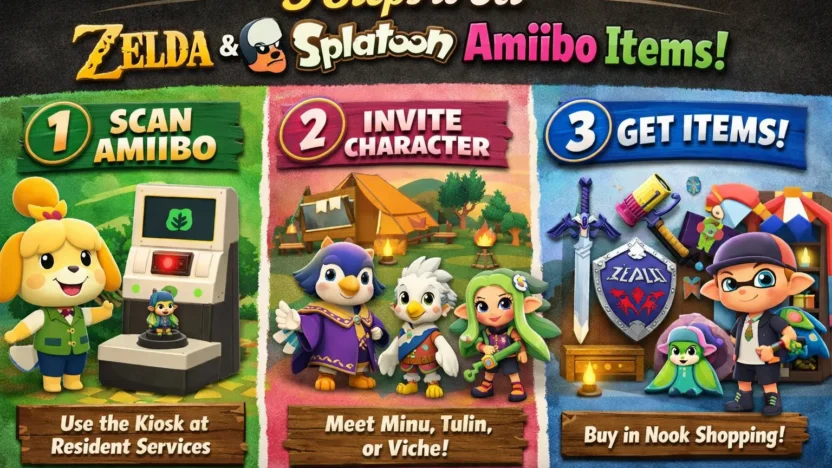
Step 1: Scan Compatible Amiibo at Resident Services
Everything starts inside Resident Services (Town Hall).
Head to the amiibo kiosk and scan a compatible amiibo figure or card. This single scan does two important things at once:
- It invites a special crossover character to your campsite for the day
- It permanently unlocks that franchise’s items in Nook Shopping
🗡️ Legend of Zelda amiibo
Scanning amiibo from The Legend of Zelda can invite Zelda-themed crossover visitors such as:
- Minu
- Tulin
These visitors can be triggered by scanning various Link, Zelda, or Ganondorf amiibo, including versions from Breath of the Wild, Tears of the Kingdom, Wind Waker, Skyward Sword, and Smash Bros.
You don’t need a specific version, any compatible Zelda amiibo works.
🦑 Splatoon amiibo
Scanning any Splatoon amiibo (Inklings, Octolings, etc.) unlocks the Splatoon crossover visitor:
- Viché
Once scanned, that amiibo series is now linked to your island permanently.
Step 2: Visit the Campsite & Craft the Requested Item
After scanning, head over to your campsite and talk to the visiting character.
Here’s what usually happens:
- The amiibo visitor asks you to craft a specific item
- You must craft it the same day
- After delivering it, they give you a small thank-you gift (often clothing)
⚠️ Important clarification:
These campsite gifts are not the main Zelda or Splatoon items you’re looking for. They’re more like bonus souvenirs.
The real unlock happens in the next step.
Step 3: Unlock Zelda & Splatoon Items in Nook Shopping
This is the step most players miss—and the reason many think amiibo “didn’t work.”
Once you’ve scanned a compatible amiibo, the actual crossover items appear in Nook Shopping.
How to find them
- Open Nook Shopping (via the ATM or your NookPhone app)
- Go to Special Goods
- Select Promotions
Here’s what you’ll see:
- Zelda items after scanning a Zelda amiibo
- Splatoon items after scanning a Splatoon amiibo
Each franchise only appears after its amiibo has been scanned at least once. Scan Zelda first, you’ll only see Zelda items. Scan Splatoon later, and those items get added below.
Daily Purchase Limit (And How Players Bypass It)
There is one limitation to keep in mind:
👉 You can only order 5 promotional items per day.
Many players use a classic time-travel method:
- Order 5 items
- Save and fully exit the game
- Open Nintendo Switch System Settings
- Turn off Synchronize Clock via Internet
- Move the system date forward by one day
- Reload the game
- Order 5 more items
Repeat until you’ve ordered everything you want.
This method is optional—but very popular if you’re building a full Zelda or Splatoon room in one sitting.
Claiming & Using Your Items
All ordered items arrive in your mailbox the following day.
- Open each package one by one
- Store items in your inventory
- Wear them or place them inside your home
Some fun details you might not notice at first:
- Equipping the Master Sword and Hylian Shield plays a classic Zelda treasure-chest sound
- Zelda wallpapers and floors instantly turn rooms into shrine-like spaces
- Splatoon items bring bold colors and modern, street-style vibes
You can even create a full Zelda-themed room, complete with:
- Triforce décor
- Guardian-style props
- Goddess statues
- Zonai-inspired elements
(They’re decorative only, no pulling the Master Sword from the pedestal, unfortunately.)
To recap:
- Scan the amiibo
- Visit the campsite (optional, but fun)
- Buy the actual items through Nook Shopping
That’s it. No randomness. No luck required.
If you’re a fan of Zelda or Splatoon, this is easily one of the best customization features the update added, and it works perfectly even without a Switch 2 upgrade.